How to stop junk mail
Keep one mailing label from each sender. The right opt-out depends on what is arriving in your mailbox.
To stop paper junk mail in the United States, use the sender's catalog-removal form for catalogs, OptOutPrescreen for prescreened credit offers, and DMAchoice for participating marketers. No single list stops every kind of mail.
- Keep one mailing label from each sender. Match the name, address, and customer number on the piece. Our catalog-removal template gives you wording for the request.
- Separate prescreened credit and insurance offers. These need the credit bureaus' opt-out process, not a general catalog request.
- Check who the mail is addressed to. A Current Resident flyer and mail for a former resident need different handling.
- Record what you requested and when. Allow for mail already prepared, then compare any new label before following up. A submitted request is not proof of removal.
Can I stop junk mail through USPS?
Refusing a piece of mail is different from unsubscribing from the sender's list. USPS permits refusal of eligible unopened mail, with exceptions. That handles the piece you received, not every future advertisement. Read our guide to Refused and Return to Sender before putting anything back in the mail.
USPS Hold Mail is a temporary pause for all mail delivered to an eligible address, including letters and packages. It lasts 3 to 30 days. It is not a junk-mail filter, and the held mail is delivered or collected afterward.
To reduce future advertising, change the mailing list rather than the delivery schedule. The FTC's junk-mail guidance points to marketing preferences and the credit bureaus' prescreening opt-out. Choose the right opt-out below, or use a sender-specific guide for a catalog that keeps coming.
Start with the piece in your hand
Use the detailed instructions that match the mailer, recipient, or sender:
By mail type
- Catalogs
- Grocery circulars and coupon mailers
- Phone books and Yellow Pages
- Car warranty offers
- Prescreened credit and insurance offers
- Insurance offers
- Mortgage and refinance offers
- Personal-loan offers and live checks
- Charity appeals
- College brochures and student recruitment mail
- Magazines and magazine offers
- Political campaign mail
- Real estate postcards and property offers
By recipient
Tools and facts
By sender
- AARP
- Academy Sports + Outdoors
- ACLU
- Acxiom
- ALS Association
- Alzheimer's Association
- American Cancer Society
- American Diabetes Association
- American Express
- American Heart Association
- American Lung Association
- Amnesty International USA
- Anthropologie
- Arhaus
- Arthritis Foundation list sharing
- ASPCA
- AT&T
- Audubon
- Balsam Hill
- Bank of America
- Bass Pro Shops and Cabela's
- Bath & Body Works
- Baudville
- Best Buy
- Bluestone Perennials
- Boden U.S.
- Boston Proper
- Boys Town
- Boys & Girls Clubs of America
- Bloomingdale's
- Bits and Pieces
- Blick Art Materials
- Current Catalog
- LTD and Lakeside
- Bradford Exchange
- Breck's
- Brighton
- Brooks Brothers
- Capital One
- CARE
- Carter Center
- Carve Designs
- Catholic Relief Services
- Chase
- Chico's, Soma and White House Black Market
- ChildFund International USA
- Christianbook
- Citizens Bank
- Coldwater Creek
- Collections Etc.
- Collette
- Costco
- Country Door
- Covenant House International
- Crate & Barrel
- Crutchfield
- Cystic Fibrosis Foundation
- Consumer Reports
- Data Axle
- DAV (Disabled American Veterans)
- Defenders of Wildlife
- David Austin Roses
- Design Within Reach
- Discover Card
- Direct Relief
- Doctors Without Borders USA
- Dover Saddlery
- Duluth Trading
- Easterseals
- Environmental Defense Fund (EDF)
- Epsilon
- Experian marketing data
- Feed the Children
- FullBeauty Brands
- Feeding America
- Filson
- Fisher House Patriot magazine
- Food For The Poor
- Gardener's Supply
- GEICO
- Grand Circle Travel and OAT
- Guideposts
- Greenpeace USA
- Gurney's
- Habitat for Humanity International
- Hanna Andersson
- Harry & David
- Heifer International
- H&M
- Home Depot
- Humane World for Animals
- Huntington
- International Rescue Committee (IRC)
- IFCJ
- J.Crew
- J.McLaughlin
- Jockey
- Johnny's Selected Seeds
- Johnston & Murphy
- J.Jill
- Judicial Watch list sharing
- King Arthur Baking
- Kohl's
- Macy's
- March of Dimes
- MDA (Muscular Dystrophy Association)
- Make-A-Wish
- Mercy Corps and Prosper Global
- Miles Kimball
- Medicare and private plan mail
- MoMA Design Store
- Money Mailer
- National Wildlife Federation
- National Park Foundation
- National Kidney Foundation
- National MS Society
- NPCA (National Parks Conservation Association)
- Nature Conservancy
- Nordstrom
- NRDC (Natural Resources Defense Council)
- Northern Tool
- Lands’ End
- L.L.Bean
- Lee Valley
- Oriental Trading
- O'Neill
- Operation Smile
- Optimum
- Orvis
- Oxfam America list sharing
- Paralyzed Veterans of America
- Parkinson's Foundation
- Paul Fredrick
- Pendleton
- POLYWOOD
- PESI seminar brochures
- PETA Global magazine
- Peter Millar
- Pottery Barn
- Planned Parenthood Federation of America
- Publishers Clearing House
- Prison Fellowship
- Red Cross
- REI
- Regions Bank
- RailRiders
- RH and Restoration Hardware
- Road Scholar
- Salvation Army USA
- Samaritan's Purse
- Save.com
- Save the Children U.S.
- Sephora
- Schweitzer Linen
- Silverts
- Serena & Lily
- Shriners Children's
- Shutterfly
- SiriusXM
- Smile Train
- Soft Surroundings
- Sharper Image
- SmartPak
- SoFi
- Special Olympics
- Spectrum
- Staples
- St. Jude
- St. Joseph's Indian School
- State Farm
- Stio
- Territorial Seed
- T-Mobile
- Talbots
- Target
- Tea Collection
- Tauck
- TD Bank U.S.
- Tecovas
- The Company Store
- Title Nine
- Tommy Bahama
- Touch of Class
- Truist
- Tunnel to Towers
- Uline
- Uncommon Goods
- U.S. Bank
- USO
- Valpak
- Verizon
- Vermont Country Store
- VFW
- Viking Cruises
- Vineyard Vines
- Wells Fargo
- Walmart
- West Elm
- White Flower Farm
- YMT Vacations
- Williams Sonoma
- World Wildlife Fund U.S.
- World Vision U.S.
- Wounded Warrior Project
- Woodcraft
- Xfinity
Choose the right opt-out for your mail
Catalogs and mail addressed to you
For a catalog you no longer want, look for the sender's mailing-preferences form or customer-service contact on its official website. Ask to remove the name and address printed on the mailing label. Include a customer or source number if the sender asks for it. Keep the request and any reply so you can follow up.
Catalog Choice is a free nonprofit option: search for a sender, then follow its opt-out process. Junk Mail Magic offers a photo-based alternative when you prefer help with sender lookup and preparing the request.
Prescreened credit-card and insurance offers
Use OptOutPrescreen, the credit bureaus' opt-out service. The FTC explains that an online request can opt you out for five years; a permanent opt-out requires returning a signed form. This covers offers based on prescreened credit-bureau lists, not every promotion from a bank or insurer.
Complete that process on the official site. Do not upload identity documents or send Social Security numbers to Junk Mail Magic. A request to an individual sender is not the same as opting out of credit-bureau prescreening.
Unsure about the personal details the form asks for? Our credit-offer guide explains which identity details are optional and gives the official phone alternative.
Broader marketing preferences
DMAchoice, operated by the Association of National Advertisers, lets you register preferences for participating marketers. It charges a processing fee. It can reduce covered promotional mail, but it is not a universal block on all senders. Check its current terms before registering. Our opt-out comparison separates broad preference services from individual sender requests.
Flyers marked “Current Resident”
Some neighborhood mail goes to an area rather than a named person. There may be no personal mailing-list entry to remove. Check with the sender about its delivery program before spending a request on this type of mail. Do not assume a name-based unsubscribe will stop it. Our Current Resident mail guide explains the difference.
Bills, notices, and mail for someone else
Set aside bills, legal documents, government notices, and anything important. Only submit mail addressed to you or someone you are authorized to help. An unwanted envelope is not necessarily an advertising mailing.
How to unsubscribe using a photo
Junk Mail Magic uses the piece of mail in front of you to identify the sender and prepare a specific removal request. Here is the workflow in the app:
- Photograph one mailer. Keep the sender name and your full mailing label readable. Use good light and avoid glare. A close photo of the label is more useful than a distant shot of a pile.
- Review the details. Check the sender and recipient information before submitting. If the photo is unclear or does not look like mail, retake it instead of submitting unrelated information.
- Submit the request. Sign in and send the selected photos. We prepare the opt-out using the available sender contact route. Check the service email for the processing result.
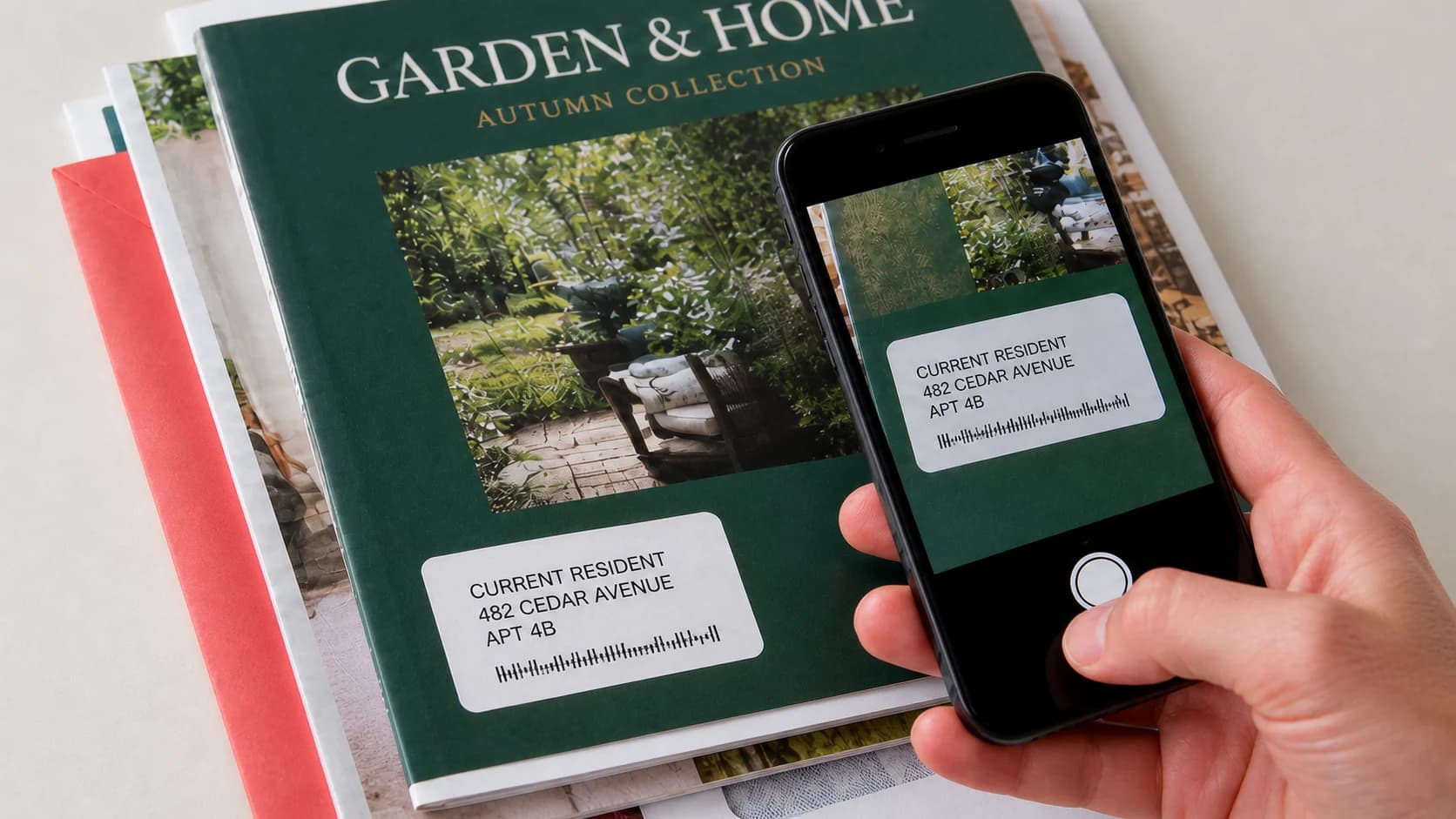
You can add multiple separate photos to a batch within your allowance. Five mailers in one photograph are not supported as five requests. One photo per mailer keeps each request tied to the right sender and address.
Your first request is free, with no card required. A one-time pack costs $9.99 for 20 requests. The optional monthly plan is $7.99 for 20 requests per billing period and renews until canceled. Monthly credits do not roll over. You can cancel future renewals from Account. Compare the plans.
What happens after an unsubscribe request?
A submitted request is not confirmation that the sender has removed you. Mail already printed or in transit may still arrive for several mailing cycles, and the sender controls its response. Junk Mail Magic cannot guarantee that every sender will stop mailing.
Keep any sender confirmation alongside the date of your request. If the same mail keeps arriving, compare the mailing label and sender details with the original request. A different name, address variation, or sender may need separate attention. Contact our support team when you need help with a Junk Mail Magic request.
What information does the service use?
The photo may contain your name, postal address, and customer number. Processing providers help analyze it, and the relevant sender receives the information needed for removal. Read our Privacy Policy and Terms before submitting. You do not need to send your whole mail pile to begin.
Start with one unwanted catalog.
Try one request free and decide whether the convenience works for you.
Try one request free